Creating Opportunities
Creating Opportunities
Post grants, residencies, exhibitions, jobs, and other opportunities for artists on Artsume.
The builder at a glance
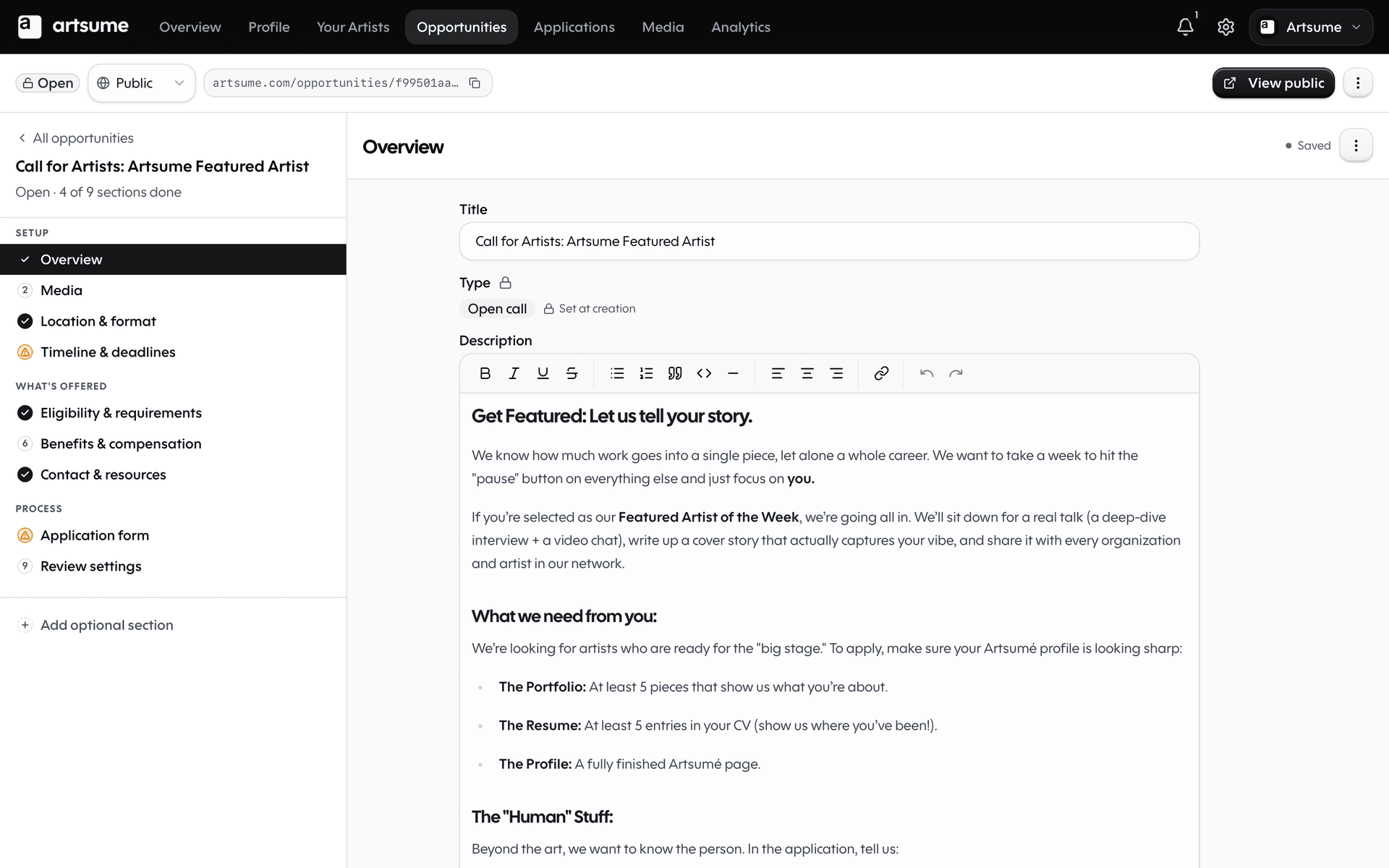
The opportunity builder is split into three regions:
- The section rail on the left lists the sections you've enabled (Overview, Eligibility, Application Form, Timeline, and so on). Each one shows a completion indicator.
- The form area in the middle holds whichever section you're editing.
- The Configure rail on the right slides in when you click a Configure button — for the Portfolio, Statement, CV Import, or Contact Fields editors. Your form stays visible while you set things up.
Above all three sits the top bar with your title, save status, and the Publish controls.
Every form saves on its own schedule. You'll never see a global "Save" button — just an autosave indicator in the top bar that tells you whether everything is up to date.
Start a new opportunity
- From your organization dashboard, click Create Opportunity
- Choose opportunity type: Grant, Residency, Exhibition, Job, Fellowship, Commission, Open Call, or Other
Basic information
Fill in the essentials:
Title: Clear and specific. "2024 Emerging Artist Grant" not "Grant Opportunity"
Description: What the opportunity is, who it's for, what artists will receive. Be specific about:
- What you're offering (funding amount, residency length, exhibition space)
- What you expect from selected artists
- Timeline and important dates
Type: Select the opportunity category
Disciplines: Which artistic disciplines can apply
Add or remove sections
Not every opportunity needs every section. A simple grant doesn't need a Selection Process page. A residency might not need a Legal Contract upfront.
Each optional section has an + Add button when it's hidden and a Remove affordance when it's shown. Hidden sections never appear in the builder rail, never block you from publishing, and don't show up as incomplete.
Decisions, Legal, Selection Process, and a handful of others are optional by default. Turn them on if you need them; leave them off if you don't.
Set eligibility
Define who can apply:
- Career stage: Emerging, mid-career, established, or any
- Location: Geographic restrictions (country, state, city)
- Age: Age requirements if any
- Other criteria: Specific qualifications
Be precise. Vague eligibility wastes time for ineligible applicants and your review team.
Build your application form
The application form is its own section in the builder. The big building blocks — Portfolio, Statement, CV Import, Contact Fields — each have a Configure button next to them. Click Configure and an editor slides in from the right with the detailed options for that block. Your form stays visible the whole time.
Add fields for what you need from applicants:
Standard fields:
- Personal information (pre-filled from artist profiles)
- Portfolio works (specify minimum/maximum)
- CV sections (which ones you need)
- Artist statement
Custom questions:
- Short answer (limited text)
- Long answer (paragraph responses)
- Multiple choice
- Checkboxes
- File uploads
Keep it focused
Only ask for what you actually need to evaluate applications. Long forms discourage quality applicants.
Portfolio requirements
Specify:
- Minimum and maximum number of works
- Accepted media types (images, video, audio)
- Whether you want descriptions or notes for each work
CV requirements
Select which CV sections applicants should include:
- Education
- Exhibitions
- Awards
- Publications
- Professional experience
- etc.
Set deadlines
Application deadline: When applications close (include timezone)
Review period: When your team will review
Notification date: When applicants hear back
Start date: When the opportunity begins (for residencies, exhibitions, etc.)
Give artists enough time to prepare strong applications. Rushed deadlines often mean weaker applicant pools.
Configure fees
If you charge application fees:
- Enable fees in opportunity settings
- Set the fee amount
- Configure payment processing
- Optional: Set up fee waivers for eligible applicants
Fee waivers help ensure financial barriers don't exclude qualified artists.
Review settings
Configure how you'll evaluate applications:
Scoring mode: Pick one of three styles based on how much rigor you want.
- Recommendation — quick "Yes / Maybe / No" icon chips. Best for fast triage.
- Sliding scale — a single overall score per application.
- Rubric — your full scoring rubric with weighted criteria.
You can switch modes between opportunities; reviewers see whichever picker matches the opportunity they're reviewing.
Reviewers:
- Assign team members to review
- Set up reviewer pools for external jurors
- Configure blind review if wanted
See Reviewing Applications for detailed review setup.
Preview and publish
The Publish controls live in the sticky top bar above the builder. Two ways to get there:
- The Publish button in the top bar opens a pre-flight summary listing anything still missing across enabled sections. If everything checks out, publish from the summary.
- Preview in the top bar shows how the opportunity appears to artists before you publish.
Published opportunities appear in the Explore section where artists can find and apply.
Manage your opportunity
After publishing:
Edit: Update details, extend deadlines
Pause: Temporarily hide from new applicants
Close: Stop accepting applications
Archive: Move to archive after completion
Track applications
As applications come in:
- View count on your dashboard
- Monitor submissions against your deadline
- Start reviewing as applications arrive (or wait until deadline)
Frequently Asked Questions
What's next
- Reviewing Applications: Evaluate and select artists
- Team Collaboration: Work with reviewers and staff
Topics
Related Tutorials
Affiliated Artists
Manage the artists connected to your organization: verify CV claims, handle disputes, and track the lifecycle of every association.
Best Practices
Best practices for artists and organizations on Artsume: profile optimization, portfolio presentation, application strategies, and review processes.
Creating Your Profile
Build your Artsume artist profile: handle, disciplines, statement, visibility, and images. Step-by-step setup guide.